Outsourced sales development for managed IT services

MSP lead generation: meetings with owners who are done with their current IT setup

Most managed services deals start when an owner gets frustrated with the person or company handling IT today. We book meetings with those owners and their finance and operations leads before the frustration turns into a quick referral to someone else, so your MSP is already in the conversation when they decide to switch.

Ask Ava anything about the information on this page.

Verified performance benchmarks

What it takes to book an MSP meeting

Real activity and outcomes logged on MSP programs. Each figure carries its definition, and the panel below says exactly what it covers.

Abstrakt sales center data
  • 594,121prospecting callsOutbound dials logged by Abstrakt SDRs on client programs in this vertical.
  • 3,657appointments setMeetings booked with a decision-maker who met the client's criteria.
  • 162dials per appointmentCalls divided by appointments set, rounded.
  • 10.0%of opportunities reached a proposalOpportunities are appointments that became a sales opportunity. Not a rate per appointment.
  • 20.5%of proposals were wonProposals the client reports winning, divided by proposals sent.
Period
Cumulative program history through October 2026.
Scope
National. Abstrakt client programs in the "IT/Cyber Security/MSP" vertical. No market-level rates.
Sample
594,121 calls and 3,657 appointments set.
Source
Abstrakt sales center, Performance Intelligence (Abstrakt's internal program reporting), imported 2026-10-01.
Not a promise
Historical averages across many programs, not a forecast or a promise for any single program. Client mix, offers and target lists differ.

How the sales center benchmarks are measured

Customer results

Real results from managed IT services companies

Approved MSP client stories, closed business and testimonials. Every figure says what it is and the period it covers. See every IT result.

2 verified results

IT and managed services: closed business and signed agreements
AmountClassificationIndustryClientPeriodContext and source
$41,518Closed businessIT and managed servicesClient not namedReported 2026-10-07Deal value reported to Abstrakt by a client. Closed business snapshots, abstraktmg.com/abstrakt-at-a-glance/ (read 2026-10-12)
$59,112Closed businessIT and managed servicesClient not namedReported 2026-09-21Deal value reported to Abstrakt by a client. Closed business snapshots, abstraktmg.com/abstrakt-at-a-glance/ (as published late September 2026)

Hear it from IT clients

  • Appointment setting

    ABQ

    Greg of ABQ IT in New Mexico needed managed IT clients beyond its recycling customers. Abstrakt built a list around his compliance and cybersecurity strengths, then used calls and cold email to open conversations ABQ IT would not have had otherwise.

  • Appointment setting

    Visitude

    Jason Elquiza, president and COO of Visitude, an IT managed services provider, saw an early win once appointments started coming. He points to three things: steady appointments, messaging customized to his business, and close collaboration that feels like an extension of his team.

  • Appointment setting

    CII Technology

    CII Technology's first year back with Abstrakt was about getting in front of the right companies. The owner explains why steady, top-quality appointments give his IT firm an edge over other providers its size, and how to follow up so those meetings turn into contracts.

Who we target

The MSP buyers our SDRs reach

Start with the owner or managing partner and the controller or office manager who handles the IT budget and the insurance application, and bring in the internal IT lead where there is one.

Decision-makers and influencers

  • Owner / president / managing partnerControls

    The final decision and the relationship with whoever handles IT today, often a friend or long-time vendor

    Gets involved

    After an incident, an insurance or client security request, or when the IT person leaves

  • CFO, controller or office managerControls

    The IT budget, vendor invoices and the cyber insurance application

    Gets involved

    Budget season, cyber insurance renewal and invoice surprises

  • IT manager or internal IT leadControls

    Day-to-day systems and a strong opinion on whether outside help is a threat or relief

    Gets involved

    Any time; they know the gaps better than anyone

  • COO, operations director or practice administratorControls

    Onboarding, new locations and the staff complaints when systems are slow

    Gets involved

    Hiring pushes, new locations and system rollouts

  • Compliance officer or practice compliance leadControls

    Audit and exam readiness, written security policies, vendor due diligence

    Gets involved

    Before audits, exams, client security reviews and policy renewals

Industries and company sizes

  • Medical, dental and outpatient practices
  • Law firms
  • Accounting, tax and bookkeeping firms
  • Architecture and engineering firms
  • Insurance agencies and brokerages
  • Wealth management and investment firms
  • Real estate brokerages and property management offices
  • Manufacturers
  • Wholesale distributors
  • Construction contractors
  • Nonprofits and member organizations
  • Private schools and education providers

What makes an account worth calling

  • 20 to 200 seats, past informal IT. Professional offices of that size run on email, file shares and line-of-business software, and usually have one overloaded person or a break-fix vendor holding it together. That is where a managed agreement replaces a phone number.
  • Regulated data or client security reviews. Patient records, client financial data, legal files and defense contract work make IT a compliance question, not only a help desk question, and someone has to answer the questionnaire.
  • Multiple locations. Franchise groups, branch offices and service companies need the same network, devices and security at every site, which a single in-house IT person struggles to cover.
  • Downtime that stops revenue. Manufacturers and distributors run shop floor systems, ERP and the office network on the same infrastructure, so a server or network failure stops shipments and owners pay attention to backup and recovery.
  • An internal IT team of one or two. Co-managed IT is an easier first sale: you take the help desk, security tooling and after-hours coverage while their staff keep the projects.

Qualification criteria

  • Inside your service area and in an industry and size range you want
  • The person in the meeting signs or shapes the IT decision
  • Seat count and locations you can support
  • A stated problem, a known agreement end date, or a compliance or insurance deadline
  • Who handles IT today captured, person or company
  • A confirmed date and time for a sales conversation

Prospect intelligence from our MSP programs

Fewest dials per appointment first, so the list starts where meetings come easiest. Rows with fewer than 30 opportunities are left out.

Titles

  1. Office Manager102
  2. Vice President111
  3. IT Director113
  4. IT Manager133
  5. Executive Director137

Prospect industries

  1. Organizations (Non-Profit)112
  2. Education115
  3. Hospitality133
  4. Transportation134
  5. Wholesale144

Dials per appointment, national. Source: Abstrakt sales center, Performance Intelligence, cumulative through October 2026.

Buying triggers

What opens an MSP account

These are reasons a buyer may be open to a conversation, not proof that anyone is buying. Some we can see before the first call; the rest only the buyer can confirm.

  • Observable signal visible before the call: new offices and locations, hiring, leadership changes, acquisitions, published breaches
  • Learned on the call only the buyer can tell us
  • Observable signalThe IT person leaves

    When the internal admin or the one-person vendor moves on, the company has to decide whether to replace them or outsource.

  • Observable signalGrowth past an employee band, a new office or an acquisition

    More seats and new sites expose a network and device setup that was built for a smaller company.

  • Observable signalNew owner, executive or finance lead

    New leaders review vendors and costs in their first year, and IT is usually on the list.

  • Learned on the callA security incident or close call

    A phishing loss, ransomware scare or compromised mailbox makes the owner question the current setup in a way nothing else does.

  • Learned on the callCyber insurance renewal or a client security review

    The questionnaire asks for controls such as multi-factor sign-in, tested backups and endpoint protection that the business may not have, and someone has to put them in place before the deadline.

  • Learned on the callA compliance requirement with a date

    A HIPAA risk analysis, a CMMC assessment for a defense supplier, a SOC 2 report a client asks for, or a written security plan under the FTC Safeguards Rule turns IT into a deadline.

  • Learned on the callEnd-of-life hardware and software

    Servers, firewalls and operating systems reaching the end of vendor support force a project, and projects open the door to a managed agreement.

  • Learned on the callAgreement end date with the current provider

    Contracts with the current MSP run out on their own schedule. The end date is when an unhappy client can switch cleanly.

Why "not now" is still a prospect. Most businesses already have someone handling IT, so a no on the first call is usually a timing answer or a sign the current setup is working for now. The useful outcome of that call is the name of whoever handles IT today, whether it is a person or a company, when any agreement ends, and what the owner or controller wishes were different. Recorded and revisited, that turns a no into a meeting before the agreement ends, the next insurance renewal or the next budget.

How Abstrakt works in managed IT services

We build the pipeline. Our clients close the business.

The same six steps run on every program. What changes for managed service providers is who we call, the reason we give them, and the agreement end date we track. It is our appointment setting for commercial contractors, with the phone work done by our cold calling services team.

  1. 01 · Build your target market

    Build the target list

    Businesses with 20 to 499 employees in the industries you serve best, inside the area your engineers can reach for on-site work, with the owner, finance lead and any internal IT contact identified for each. We start with the prospect industries and titles that have booked fastest on our MSP programs.

    How Abstrakt Intelligence builds the list
  2. 02 · Launch your marketing strategy

    Run phone, email and LinkedIn as one

    Your SDR works phone, email and LinkedIn under your company's name, so the prospect knows the name before the call.

    The team and technology behind it
  3. 03 · Qualify target companies and decision-makers

    Reach the people who decide

    Start with the owner or managing partner and the controller or office manager who handles the IT budget and the insurance application, and bring in the internal IT lead where there is one.

    What "Right Contact" means
  4. 04 · Decision-maker introduction

    Confirm the reason to meet

    Frustration with the current IT setup, a security close call, an insurance or compliance deadline, or an agreement coming to an end. Right company and size, right person, a real problem or a known date, and an agreed meeting time.

    The 5 Star quality process
  5. 05 · Nurture qualified companies

    Stay in touch until it is time

    Re-contact before the agreement end date, the insurance renewal and budget season; share something useful about an end-of-support date or a requirement that applies to them. The agreement end date goes in the record so the next call lands on time.

    Our process, stage by stage
  6. 06 · New sales appointments

    Book the meeting

    A confirmed meeting with business owners and office managers, checked for right company, right contact and right timing, and graded on our 25-point 5 Star Scorecard before it reaches your calendar. You receive the seat count and locations, who handles IT today, the agreement end date, the decision process and the exact reason they agreed to meet. Every call and booked meeting is visible to you in the Results Portal.

    What happens after a meeting is booked
Abstrakt Intelligence · Targeting

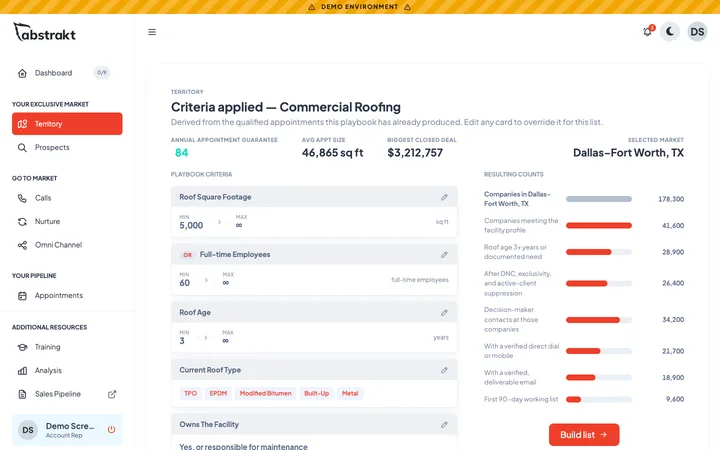
Every list starts with the qualified prospects Abstrakt Intelligence finds in your industry, each one verified by our team.

See how lists are built

Real platform screen. Companies and contacts are fictional.

Calculate my opportunity

What an MSP pipeline takes, in your numbers

Set a monthly meeting goal and your own conversion rates. Green tags are Abstrakt history, gray tags are your inputs. Contract value appears once you enter your own average: we never fill one in.

Your inputs

162 is the historical MSP average from our sales center. Change it to test your own.

An appointment is not a proposal. 25% is only a starting example, not Abstrakt data: use your own experience.

20.5% of MSP proposals were won across our programs. Your close rate depends on your own sales process.

What one managed IT agreement bills in a year (the monthly fee times 12).

A typical server, firewall, migration or security project.

1 shows first-year value only.

Illustrative math from your inputs. It updates as you type.

  • 1,296dials a month
  • 62dials every working day
  • 2proposals a month
  • 0.4wins a month, on average
  • 4.9wins from 12 months at this pace
  • 96meetings over 12 months
  • Enter your average values to see contract value. We do not fill in a number for you.

How this works: appointments x dials per appointment = outreach, spread over 21 working days. Appointments x your proposal rate x win rate = wins. Wins x your value = contract value: what signed work is worth, not revenue recognized, and recurring contracts bill over their term. Fractions are monthly averages. Not a forecast, a quote or a promise.

Market opportunity

Explore your MSP market opportunity

Search 100 metros for the local numbers: how many IT services firms compete, how many target businesses buy the work, and which account types to call first. Most target businesses per IT firm in the data: Saginaw, McAllen, Central Valley, Grand Rapids, Springfield.

Type a city or state, then pick a market.

    MSP market snapshot

    Saginaw, MI

    • 13computer systems design, computer facilities management and other computer services firms competing
    • 241businesses with 20 to 499 employees in the industries MSPs sell to
    • 18.5target businesses per IT firm

    Account types to call first: Medical, dental and outpatient practices, Manufacturers, Construction contractors

    IT firms: U.S. Bureau of Labor Statistics, Quarterly Census of Employment and Wages, private ownership, 2026 Q1, computer systems design, computer facilities management and other computer services firms (NAICS 541512, 541513 and 541519). Target businesses: U.S. Census Bureau, County Business Patterns 2023, establishments with 20 to 499 employees in the categories that buy MSP work. These are establishment counts, not qualified prospects: qualification happens on the call. Territory availability is not shown here because it changes as programs start; a strategist confirms it against current territory records.

    Browse all 100 MSP market guides
    100 markets
    Managed Service Providers market guides. Column headers sort the table.
    Market IT firms Target businesses Per IT firm Largest category
    Birmingham, AL market page 499 1,691 3.4 Medical, dental and outpatient practices
    Huntsville, AL market page 530 656 1.2 Manufacturers
    Phoenix, AZ market page 2,940 6,236 2.1 Construction contractors
    Tucson, AZ market page 296 1,065 3.6 Medical, dental and outpatient practices
    Little Rock, AR market page 192 974 5.1 Medical, dental and outpatient practices
    Central Valley, CA market page 245 2,776 11.3 Medical, dental and outpatient practices
    Los Angeles, CA market page 4,339 17,537 4.0 Manufacturers
    Oxnard, CA market page 237 960 4.1 Manufacturers
    Riverside, CA market page 557 4,257 7.6 Construction contractors
    Sacramento, CA market page 855 2,831 3.3 Construction contractors
    San Diego, CA market page 1,318 4,192 3.2 Construction contractors
    San Francisco, CA market page 3,002 6,338 2.1 Construction contractors
    San Jose, CA market page 1,629 2,531 1.6 Manufacturers
    Santa Cruz, CA market page 67 255 3.8 Medical, dental and outpatient practices
    Santa Rosa, CA market page 112 705 6.3 Manufacturers
    Stockton, CA market page 144 717 5.0 Manufacturers
    Colorado Springs, CO market page 917 862 0.9 Medical, dental and outpatient practices
    Denver, CO market page 3,919 4,304 1.1 Construction contractors
    Bridgeport, CT market page 1,067 1,237 1.2 Medical, dental and outpatient practices
    Hartford, CT market page 1,084 1,776 1.6 Manufacturers
    Washington, DC market page 10,066 8,197 0.8 Construction contractors
    Cape Coral, FL market page 281 945 3.4 Construction contractors
    Daytona Beach, FL market page 193 567 2.9 Medical, dental and outpatient practices
    Jacksonville, FL market page 703 2,002 2.8 Construction contractors
    Miami, FL market page 3,187 7,665 2.4 Medical, dental and outpatient practices
    North Port, FL market page 451 955 2.1 Construction contractors
    Orlando, FL market page 1,209 3,357 2.8 Construction contractors
    Tampa, FL market page 1,990 3,996 2.0 Medical, dental and outpatient practices
    West Palm Beach, FL market page 795 1,964 2.5 Medical, dental and outpatient practices
    Atlanta, GA market page 5,397 7,819 1.4 Medical, dental and outpatient practices
    Honolulu, HI market page 653 1,064 1.6 Construction contractors
    Boise City, ID market page 482 1,174 2.4 Construction contractors
    Chicago, IL market page 3,474 13,201 3.8 Manufacturers
    Indianapolis, IN market page 1,233 3,224 2.6 Medical, dental and outpatient practices
    South Bend, IN market page 90 486 5.4 Manufacturers
    Des Moines, IA market page 716 1,058 1.5 Construction contractors
    Wichita, KS market page 392 974 2.5 Manufacturers
    Lexington, KY market page 507 758 1.5 Medical, dental and outpatient practices
    Louisville, KY market page 1,245 1,939 1.6 Manufacturers
    Baton Rouge, LA market page 445 1,205 2.7 Construction contractors
    New Orleans, LA market page 608 1,344 2.2 Medical, dental and outpatient practices
    Portland, ME market page 537 825 1.5 Medical, dental and outpatient practices
    Baltimore, MD market page 2,164 3,898 1.8 Construction contractors
    Boston, MA market page 2,614 7,160 2.7 Medical, dental and outpatient practices
    Springfield, MA market page 67 612 9.1 Manufacturers
    Worcester, MA market page 274 1,020 3.7 Manufacturers
    Detroit, MI market page 1,125 6,008 5.3 Manufacturers
    Grand Rapids, MI market page 212 2,235 10.5 Manufacturers
    Saginaw, MI market page 13 241 18.5 Medical, dental and outpatient practices
    Minneapolis, MN market page 1,364 6,276 4.6 Manufacturers
    Kansas City, MO market page 1,818 3,289 1.8 Construction contractors
    St. Louis, MO market page 959 3,954 4.1 Manufacturers
    Omaha, NE market page 467 1,426 3.1 Construction contractors
    Las Vegas, NV market page 1,548 2,501 1.6 Construction contractors
    Manchester, NH market page 235 680 2.9 Manufacturers
    Albuquerque, NM market page 500 1,053 2.1 Construction contractors
    Albany, NY market page 475 1,107 2.3 Medical, dental and outpatient practices
    Buffalo, NY market page 253 1,600 6.3 Manufacturers
    New York, NY market page 7,844 23,343 3.0 Medical, dental and outpatient practices
    Poughkeepsie, NY market page 203 633 3.1 Medical, dental and outpatient practices
    Rochester, NY market page 272 1,335 4.9 Manufacturers
    Syracuse, NY market page 158 811 5.1 Medical, dental and outpatient practices
    Charlotte, NC market page 2,338 4,044 1.7 Manufacturers
    Greensboro, NC market page 296 1,238 4.2 Manufacturers
    Raleigh, NC market page 2,160 2,007 0.9 Construction contractors
    Akron, OH market page 253 1,098 4.3 Manufacturers
    Cincinnati, OH market page 1,291 3,238 2.5 Manufacturers
    Cleveland, OH market page 848 3,385 4.0 Manufacturers
    Columbus, OH market page 1,282 2,949 2.3 Medical, dental and outpatient practices
    Dayton, OH market page 405 1,128 2.8 Manufacturers
    Oklahoma City, OK market page 1,023 1,759 1.7 Construction contractors
    Tulsa, OK market page 722 1,511 2.1 Manufacturers
    Portland, OR market page 1,714 3,864 2.3 Manufacturers
    Allentown, PA market page 167 1,093 6.5 Manufacturers
    Harrisburg, PA market page 229 935 4.1 Medical, dental and outpatient practices
    Philadelphia, PA market page 3,025 8,606 2.8 Medical, dental and outpatient practices
    Pittsburgh, PA market page 569 3,735 6.6 Medical, dental and outpatient practices
    Providence, RI market page 937 2,072 2.2 Manufacturers
    Charleston, SC market page 573 996 1.7 Medical, dental and outpatient practices
    Columbia, SC market page 389 972 2.5 Construction contractors
    Greenville, SC market page 411 1,211 2.9 Manufacturers
    Chattanooga, TN market page 222 798 3.6 Manufacturers
    Knoxville, TN market page 372 1,243 3.3 Medical, dental and outpatient practices
    Memphis, TN market page 411 1,721 4.2 Medical, dental and outpatient practices
    Nashville, TN market page 1,310 2,991 2.3 Medical, dental and outpatient practices
    Austin, TX market page 2,264 3,193 1.4 Construction contractors
    Dallas, TX market page 6,078 10,653 1.8 Medical, dental and outpatient practices
    El Paso, TX market page 138 767 5.6 Medical, dental and outpatient practices
    Houston, TX market page 2,994 9,095 3.0 Manufacturers
    McAllen, TX market page 41 630 15.4 Medical, dental and outpatient practices
    San Antonio, TX market page 839 2,733 3.3 Medical, dental and outpatient practices
    Provo, UT market page 314 840 2.7 Medical, dental and outpatient practices
    Salt Lake City, UT market page 1,711 2,178 1.3 Construction contractors
    Richmond, VA market page 717 1,883 2.6 Construction contractors
    Virginia Beach, VA market page 606 2,039 3.4 Medical, dental and outpatient practices
    Seattle, WA market page 7,028 5,555 0.8 Construction contractors
    Spokane, WA market page 566 820 1.4 Medical, dental and outpatient practices
    Charleston, WV market page 101 250 2.5 Medical, dental and outpatient practices
    Madison, WI market page 418 1,080 2.6 Manufacturers
    Milwaukee, WI market page 598 3,052 5.1 Manufacturers
    The talk track

    What a sales call sounds like in IT and managed services

    This is the path our SDRs follow on a good call in IT and managed services. Each line is tagged with its step in the ENGAGE Sales Process: a specific reason to talk, a pushback handled without arguing, the qualifying and decision questions, the differentiator, and a clear ask for the meeting. It earns every point on our 5 Star Scorecard.

    • Opener
    • Reason for the call
    • Pushback
    • Feel, felt, found
    • Qualify
    • Decision-making question
    • Timeline
    • Differentiator
    • Consideration question
    • Close for the meeting
    • Meeting set
    • Recap the agenda
    • Confirm details
    • Invite sent

    Dramatized example.Written from our IT and managed services talk track and voiced by AI. Names and figures are samples. This is not a recording of a real call.

    Abstrakt SDR for Northline ITBooking for a client in IT and managed services. Calling Dana Ellis, decision-maker.
    1. Opener
      Abstrakt SDRHi Dana, this is Chris with Northline IT on a recorded line. I know I'm catching you in the middle of the day, so I'll keep this short. How are you today?
    2. ProspectOkay. What's this about?
    3. Reason for the call
      Abstrakt SDRThe reason for my call, we support companies across the metro running somewhere around 80 workstations, and your support agreement came up as due for review around the first of the year. I wanted to see how support and security are being handled right now.
    4. Pushback
      ProspectWe already have an IT company.
    5. Feel, felt, found
      Abstrakt SDRI understand. A lot of the people I talk to felt the same way at first, and what they found is that a second look cost them nothing. Our assessment sits alongside what they do, a second set of eyes at no cost, and if they have everything handled the report will say so.
    6. ProspectOkay, that makes sense.
    7. Qualify
      Abstrakt SDRTwo quick things so I send the right engineer out. Are you at roughly 80 workstations, and are you the one who signs off on IT spending, or does that go somewhere else?
    8. ProspectAbout eighty, yes. And IT spending comes to me.
    9. Decision-making question
      Abstrakt SDRBesides you, who else is usually involved when a decision like this gets made?
    10. ProspectOur CEO wants to know the cost. But I make the call.
    11. Timeline
      Abstrakt SDRAnd when are you looking to have this sorted out?
    12. ProspectProbably sixty days out, so we're not stuck for another year.
    13. Differentiator
      Abstrakt SDRWhat we do differently is the assessment itself. We look at the network and the security posture first, at no charge, and you get the written findings either way. Support after that is one flat per-user price, so there are no surprise project bills.
    14. ProspectThe surprise bills are a real sore spot. Last quarter's bill still makes me twitch.
    15. Consideration question
      Abstrakt SDRIf what we show you makes sense, is Northline IT a company you'd consider working with down the road?
    16. ProspectI'd consider it.
    17. Close for the meeting
      Abstrakt SDRLet's put it on the calendar. I have Tuesday the 15th at 10, or Thursday the 17th at 2. Which is better? I'll send the invite while we're on the line, and I'll add Warren Doyle's mobile to it.
    18. Meeting set
      ProspectTuesday at ten.
    19. Recap the agenda
      Abstrakt SDRGreat. So that's Tuesday the 15th at 10 o'clock, in person at your office, and we'll keep it to thirty minutes. Warren Doyle, our project manager, will review your current setup and support contract with you, run the assessment, and leave you the written findings. When he gets there, where should he check in?
    20. ProspectFront desk. They'll bring them back.
    21. Confirm details
      Abstrakt SDRLet me confirm your details: your title, the best email for the invite, and that we're meeting at your office address.
    22. ProspectDirector of operations. It's dana dot ellis at our company dot com. And yes, main office.
    23. Invite sent
      Abstrakt SDRPerfect. I'm sending the invite now. Could you accept it when it comes through, so the time is held? Thanks, Dana. Warren will see you Tuesday.
    The MSP prospecting playbook

    How MSP accounts are won, from first call to signed work

    The research our SDRs train on for MSP programs. Open any section. The same material, with sales center data, is in The State of MSP Business Development, 2026.

    Market overview and contract economics

    How the work is bought

    Managed IT is sold one business at a time, and almost every business with a few years behind it already has someone handling IT: a person on staff, a shop that comes out when something breaks, or another MSP. Deals start when the owner gets frustrated with that setup, when an insurance renewal or client audit asks for controls nobody has put in place, or when the person who handled IT leaves. The outbound job is to be in the conversation before that frustration turns into a quick referral to someone else.

    Recurring work
    Fully managed IT agreements billed per user or per device, co-managed support alongside an internal IT person, managed security, backup and monitoring, and Microsoft 365 or other licensing.
    Projects
    Server and firewall replacements, cloud and email migrations, workstation refreshes, new office build-outs, and security and compliance projects tied to an audit or insurance renewal.
    Emergency work
    A ransomware scare, a compromised mailbox or a failed server. They get a provider in the door fast, and the monthly agreement comes from the follow-up conversation once the crisis is over.

    The MSP services worth selling outbound

    • Best fit for outboundFully managed IT agreements

      The core of the business. Every business with 20 or more seats has some IT arrangement. The agreement may have an end date, or the person or shop behind it may have a weak spot an SDR can learn about on the call.

    • Best fit for outboundNetwork and security assessments

      Easy to say yes to on a first call: a look at the network and security posture with written findings, whatever the outcome. It gives the owner something concrete and gives your engineers the scope for a proposal.

    • Good fitCo-managed IT

      The easier first sale where there is an internal IT person. You take the help desk, security tooling and after-hours coverage while their staff keep the projects, so the IT lead sees help instead of a threat.

    • Good fitSecurity and compliance projects

      Sells when a cyber insurance questionnaire, a client security review or a regulation such as HIPAA or CMMC puts a deadline on controls like multi-factor sign-in, tested backups and endpoint protection.

    • SituationalBreak-fix and one-off projects

      Nobody books a meeting for a future outage. Be the number they have when it happens, and turn the follow-up into an assessment.

    Account types and how to open each one

    12 segments
    Medical, dental and outpatient practices
    Buys
    Managed IT with HIPAA safeguards, practice management and imaging system support, backup, secure email, multi-location networks
    Reach
    Practice administrator, office manager, physician owner or managing dentist
    Opens the door
    A new location, a HIPAA risk assessment, an EHR or practice management change, a security incident

    Patient data rules and uptime at the front desk. Ask who did the last HIPAA security risk assessment and what happens when the scheduling system goes down.

    Law firms
    Buys
    Managed IT, document management support, secure remote access, email security, backup with tested restores
    Reach
    Managing partner, firm administrator, office manager
    Opens the door
    A phishing incident, a client security questionnaire, a new office or partner group, a document management change

    Client confidentiality and billable time lost to IT problems. Ask what the last client security questionnaire asked for and who answered it.

    Accounting, tax and bookkeeping firms
    Buys
    Managed IT, a written information security plan, multi-factor sign-in, secure client portals, seasonal capacity
    Reach
    Managing partner, firm administrator, office manager
    Opens the door
    Tax season problems, a written security plan requirement, a cyber insurance renewal, a merger with another firm

    Client financial data and tax season. Ask how the systems held up last season and whether the firm's written information security plan is current.

    Architecture and engineering firms
    Buys
    Managed IT, file servers or cloud storage for large drawing files, CAD workstation support, backup, remote access for field staff
    Reach
    Principal or owner, office manager, operations manager, internal IT lead
    Opens the door
    Slow file access, a workstation refresh, a new office, a client or government security requirement

    Large files, CAD and BIM workstations and project deadlines. Ask how long it takes to open a big project file from home.

    Insurance agencies and brokerages
    Buys
    Managed IT, agency management system support, email security, multi-factor sign-in, compliance documentation
    Reach
    Agency principal or owner, operations manager, office manager
    Opens the door
    A carrier or state cybersecurity requirement, an acquisition by a larger agency, a management system change

    Customer personal data and carrier requirements. Ask who handles the security controls the carriers and state regulators ask about.

    Wealth management and investment firms
    Buys
    Managed IT, compliance-ready email archiving, multi-factor sign-in, vendor and cybersecurity documentation for exams
    Reach
    Firm principal, chief compliance officer, operations manager
    Opens the door
    A regulatory exam, a custodian or broker-dealer requirement, a firm breakaway or merger, a security incident

    Exams and client trust. Ask who prepares the cybersecurity documentation when an examiner or the custodian asks for it.

    Real estate brokerages and property management offices
    Buys
    Managed IT for offices and agents, email security, wire-fraud protection, property management software support
    Reach
    Broker-owner, managing broker, office manager, operations director
    Opens the door
    A wire fraud attempt, a new office, agent growth, a change in property management software

    Wire fraud and agents who bring their own devices. Ask what the office does to verify wiring instructions and protect agent email.

    Manufacturers
    Buys
    Managed IT for office and plant networks, ERP and production system support, backup and recovery, CMMC and supplier security programs
    Reach
    Owner or president, controller or CFO, operations manager, IT manager
    Opens the door
    An ERP upgrade, a ransomware incident in the industry, a defense supplier CMMC requirement, a new line or facility

    Downtime that stops shipments. Ask what happens to production and shipping if the server or network is down for a day.

    Wholesale distributors
    Buys
    Managed IT, ERP and warehouse system support, EDI and order system uptime, backup, multi-site networks
    Reach
    Owner or president, controller, operations manager, IT manager
    Opens the door
    An ERP or warehouse system change, a new warehouse, a cyber insurance renewal, an acquisition

    Orders that cannot stop. Ask what happens to order entry and shipping when systems are down.

    Construction contractors
    Buys
    Managed IT for the office and job sites, mobile device management, project management software support, backup, secure file sharing with owners and subs
    Reach
    Owner or president, CFO or controller, operations manager, office manager
    Opens the door
    Office growth, a new branch, job site connectivity problems, a wire fraud attempt, a cyber insurance renewal

    Field crews on tablets and an office that runs the money. Ask how project managers reach plans and files from the job site.

    Nonprofits and member organizations
    Buys
    Managed IT on a set budget, Microsoft 365 nonprofit licensing, donor database support, backup, security awareness training
    Reach
    Executive director, director of operations or finance, office manager
    Opens the door
    A grant or funder requirement, a new executive director, a phishing loss, a donor database change

    Predictable cost and protecting donor data. Ask what the board or funders expect on security and how IT is budgeted.

    Private schools and education providers
    Buys
    Managed IT for staff and classrooms, student device management, network and wireless, content filtering, backup
    Reach
    Head of school or director, business manager, technology coordinator
    Opens the door
    A device refresh, a wireless upgrade, a new building, a summer project list, a security incident

    The school calendar. Projects are planned in winter and spring for summer installation, and support has to work around the school day.

    Buyer roles and what each one cares about

    5 roles
    Owner / president / managing partner
    Cares about
    Not being exposed, not being surprised by bills, and staff who can work

    Ask what happened the last time something broke and how long it took to get fixed. Lead with response time and fewer surprises, not a list of services.

    CFO, controller or office manager
    Cares about
    Predictable monthly cost and answers for the insurance questionnaire

    Lead with predictable monthly cost and ask who filled out the last insurance security questionnaire.

    IT manager or internal IT lead
    Cares about
    Getting out from under tickets to do the projects, and coverage when they are away

    Position co-managed support: ask which tickets eat their week and what they never get to.

    COO, operations director or practice administrator
    Cares about
    New hires working on day one, locations that run the same way

    Ask how long it takes to get a new hire set up with a laptop, accounts and access.

    Compliance officer or practice compliance lead
    Cares about
    Documentation that holds up when a regulator, examiner or client asks

    Offer documentation and controls that answer the questions they already have to answer.

    Qualification questions by account type

    60 questions
    Medical, dental and outpatient practices5 questions
    1. Who completed your last HIPAA security risk assessment, and when?

      The HIPAA Security Rule expects a risk analysis. A blank or an old date is a concrete, compliance-driven reason to meet.

    2. When the practice management or imaging system goes down, who do your front desk staff call, and how fast does someone respond?

      Downtime at the front desk is felt in canceled patients the same day, so response time is where practices notice a weak provider.

    3. How many locations do you run, and does each one have the same network and security setup?

      Multi-location groups often grew one office at a time, and the differences between sites are the scope for a standardization project.

    4. Is IT handled by someone on staff, a local shop or another MSP?

      A person or a shop on call is a different sale from displacing another MSP under contract, and the answer sets the timeline.

    5. Are you adding a location or changing your EHR or practice management system in the next year?

      A new site or a system change needs network, devices and data migration work before it goes live, which gets you in ahead of the agreement.

    Law firms5 questions
    1. Have any clients sent you a security questionnaire in the last year, and who filled it out?

      Corporate clients send their outside counsel security questionnaires, and the person who answered the last one knows where the gaps are.

    2. Has anyone at the firm clicked a phishing email or had a mailbox compromised?

      A close call is the event that makes a managing partner question the current setup in a way nothing else does.

    3. How do attorneys get to files and email when they are out of the office or in court?

      Remote access is where convenience and security collide, and an awkward answer is a project to price.

    4. Who handles IT today, and what happens when that person is on vacation?

      Coverage gaps are the most common opening at a small firm with one IT person or a part-time consultant.

    5. Who decides on IT spending, the managing partner, a committee or the firm administrator?

      Partnership decisions can take a meeting cycle, and knowing who signs keeps you from presenting to someone who cannot approve it.

    Accounting, tax and bookkeeping firms5 questions
    1. How did your systems hold up during last tax season, and what slowed people down?

      Tax season is when IT problems cost the most billable hours, and a bad season makes a partner open to a change before the next one.

    2. Does the firm have a written information security plan, and who keeps it current?

      Tax preparers are covered by the FTC Safeguards Rule and IRS guidance that call for a written plan; a missing or stale one is a scoped project.

    3. Is multi-factor sign-in turned on for everyone, including email and remote access?

      It is one of the first questions on a cyber insurance application, and partial coverage is common.

    4. Who supports IT today, and do they plan around your filing deadlines?

      A provider who schedules changes in the middle of tax season is a frustration you can solve.

    5. Are you merging with another firm or adding staff before next season?

      Mergers mean combining systems and accounts, which is project work that leads to the monthly agreement.

    Architecture and engineering firms5 questions
    1. How do people open large drawing and model files when they work from home or a job site?

      Slow access to big files is a daily, visible pain at design firms and points to a storage or network project.

    2. When were the CAD and modeling workstations last replaced?

      Workstation age tells you whether a hardware refresh is coming, and refresh projects open the managed agreement.

    3. Do any clients, including government agencies, ask about your security controls?

      Public-sector and defense-related work brings security requirements that a small firm often cannot meet alone.

    4. Who handles IT today: a principal, an employee with another job, or an outside firm?

      In many design firms a principal or a technical staff member holds IT together, which is billable time lost.

    5. Is anything coming that changes the setup, such as a new office, a merger or new software?

      Change gives you a project with a date attached and a reason to meet now.

    Insurance agencies and brokerages5 questions
    1. Who answers the security questions that carriers or your state insurance regulator ask about?

      Many states have adopted insurance data security laws, and agencies need someone who can document the controls.

    2. Which agency management system do you run, and who supports it when something breaks?

      The management system is the agency's core tool, and support gaps around it are felt every day.

    3. Is the agency part of a larger network or aggregator, or has it been approached about an acquisition?

      Acquisitions and network memberships bring IT standards and integration projects with deadlines.

    4. How many producers work remotely, and how do they reach client files?

      Remote producers handling personal data is where security and convenience need a real design.

    5. When does your current IT agreement or support arrangement renew?

      The end date turns a no into a scheduled conversation.

    Wealth management and investment firms5 questions
    1. When an examiner or your custodian asks about cybersecurity, who pulls the documentation together?

      Securities regulators review cybersecurity at investment firms, and the compliance officer feels that burden directly.

    2. How are email and client communications archived today?

      Recordkeeping rules make archiving a non-negotiable requirement and a common gap at smaller firms.

    3. Is the firm growing through new advisors, a merger or a breakaway from a larger firm?

      Breakaways and mergers have to stand up or combine systems on a fixed date, which is a project with urgency.

    4. Who supports IT today, and do they understand the compliance side?

      A generalist provider who cannot speak to exams is a weakness the compliance officer will name quickly.

    5. Who signs off on IT and compliance vendors, the principal or the compliance officer?

      Both often need to agree, so the meeting should include both.

    Real estate brokerages and property management offices5 questions
    1. Has the office ever had a wire fraud attempt or a spoofed email to a client?

      Real estate transactions are a known target for wire fraud, and an attempt is a powerful reason to tighten email security.

    2. Do agents use their own laptops and phones, and how is company data protected on them?

      Personal devices with client data are a common gap and a clear scope for device management.

    3. Who handles IT for the office today, and who do agents call when something breaks?

      Brokerages often lean on an office manager or an agent who is good with computers.

    4. Are you opening an office or adding a team in the next year?

      New offices need network and phone setup before they open, which gets you in ahead of the agreement.

    5. Which property management or transaction software do you run, and how is it backed up?

      The core software holds the business, and backup and recovery questions open the security conversation.

    Manufacturers5 questions
    1. If the server or network went down for a day, what would happen to production and shipping?

      Downtime that stops shipments puts a dollar figure on IT in the owner's own words, which justifies backup and recovery work.

    2. Do you supply parts or services to the Department of Defense or its prime contractors?

      Defense contracts that involve controlled information now carry CMMC requirements, so a supplier needs a certification level to win and keep that work, which is a scoped, deadline-driven project.

    3. Which ERP do you run, and is an upgrade or replacement coming?

      ERP projects touch servers, networks and security, and the provider who supports the migration usually stays.

    4. Are the plant floor systems on the same network as the office?

      A flat network is a security exposure owners rarely know about, and separating it is a concrete project.

    5. Who handles IT today, and does that person also have another job in the plant or the office?

      Part-time IT in a manufacturer is common, and coverage gaps around the shifts are the opening.

    Wholesale distributors5 questions
    1. When order entry or the warehouse system goes down, how long until someone has it back?

      Distributors lose orders by the hour, so response and recovery time are what they pay for.

    2. Did your last cyber insurance renewal ask about controls you did not have in place?

      Renewal questionnaires ask about multi-factor sign-in, backups and endpoint protection, and the controller has to answer them.

    3. How many warehouses or branches do you run, and are they on one network?

      Multi-site distributors need consistent networking and security, which is recurring work an in-house person rarely covers alone.

    4. Is an ERP, warehouse management or EDI change on the plan?

      System changes come with a go-live date and a project team that chooses providers now.

    5. Who signs off on IT spending, the owner, the controller or both?

      The controller often owns the budget while the owner makes the final call, so both belong in the meeting.

    Construction contractors5 questions
    1. How do project managers and superintendents get to plans and files from the job site?

      Field access is a daily pain at contractors and points to cloud, device and connectivity work.

    2. Has the company had a payment or wire fraud attempt involving a vendor or owner email?

      Contractors move large payments by email instruction, and an attempt makes email security urgent.

    3. How are the tablets and phones in the field managed and secured?

      Unmanaged field devices with company data are a gap the owner can see once it is named.

    4. Who handles IT today, and what happens when that person is busy with their other job?

      At many contractors IT falls to the controller or an office manager on top of their real work.

    5. Are you opening a branch or growing the office staff this year?

      Growth exposes a setup built for a smaller company and gives you a project with a date.

    Nonprofits and member organizations5 questions
    1. How is IT budgeted today, as a set monthly cost or as things come up?

      Nonprofits plan to a fixed budget, so a predictable monthly fee answers their real concern.

    2. Do any funders, grants or the board ask about how donor and client data is protected?

      Funder and board expectations put a requirement and a date on security work.

    3. Are you using the nonprofit licensing programs available for Microsoft 365 and other software?

      Licensing that was never set up correctly is a quick, visible win for the operations or finance lead.

    4. Who handles IT today, a volunteer, a staff member or an outside firm?

      Volunteer and part-time IT is common in nonprofits and leaves gaps in coverage and documentation.

    5. Has the organization had a new executive director or finance lead in the last year?

      New leaders review vendors and processes early in their tenure, which is your window.

    Private schools and education providers5 questions
    1. What is on the summer technology project list, and when is it finalized?

      School projects are decided months before summer, so this tells you how far ahead you need to be.

    2. How are student and staff devices managed and kept up to date?

      Device management is a large recurring workload for a small technology staff, and a co-managed offer fits it.

    3. Who supports IT today, a technology coordinator, a teacher with extra duties, or an outside firm?

      Many schools rely on one person, and coverage during the school day is the gap.

    4. Is the wireless network keeping up with the number of devices in classrooms?

      Wireless problems are visible to every teacher and point to a funded infrastructure project.

    5. Who approves technology spending, the business manager, the head of school or the board?

      School approvals often run through a committee or the board, which shapes the meetings and materials you need.

    Objections and what they tell you

    5 objections
    “We already have an IT guy.”

    It is usually true, and it tells you who gets called when something breaks, not what is covered. Ask whether it is a person or a company, and what happens when they are unavailable.

    Next step: Ask about restore testing and after-hours coverage, and book the meeting around the gap the owner names.

    “We're under contract with another MSP.”

    That is a date, not a no. The contract length and end month are the facts you need.

    Next step: Record the end date and nurture to it; offer a second-opinion assessment if they name a problem.

    “It's too expensive.”

    Usually a comparison against today's visible cost, not the cost of downtime, rework or a failed insurance questionnaire. Ask what the last outage or project bill cost them.

    Next step: Move the conversation to predictable monthly cost and what the current setup leaves uncovered.

    “Send me some information.”

    Often a polite exit, sometimes real interest. Ask what they would want it to cover.

    Next step: Send something specific to their size and industry, then call back with a reason.

    “Our IT person handles it.”

    Internal IT staff usually handle day-to-day support and still need help with security tooling, after-hours coverage and projects.

    Next step: Position co-managed support and ask what they never get to. That is the opening.

    Prospecting considerations

    Message and discovery
    Lead with
    Response time, security and predictable cost, not a list of services. Owners switch IT providers when something broke and nobody fixed it fast.
    Reason to call
    Frustration with the current IT setup, a security close call, an insurance or compliance deadline, or an agreement coming to an end.
    Watch for
    An incident, an insurance renewal, an audit, the IT person leaving, growth, end-of-support systems, an agreement end date.
    Learn on every call
    Seat count and locations, who handles IT today and whether it is a person or a company, agreement end date, recent incidents, insurance and compliance requirements, who signs.

    Sales cycle and timing

    When to call back

    Most businesses already have someone handling IT, so a no on the first call is usually a timing answer or a sign the current setup is working for now. The useful outcome of that call is the name of whoever handles IT today, whether it is a person or a company, when any agreement ends, and what the owner or controller wishes were different. Recorded and revisited, that turns a no into a meeting before the agreement ends, the next insurance renewal or the next budget.

    Managed IT has no weather season. Decisions follow fiscal-year budgets, cyber insurance renewals, audit and exam calendars, and the end dates of current agreements, so outbound runs every month and the message follows each account's dates.

    Following up after the meeting

    5 stages
    1. 01After the first meeting or assessment

      Send a short summary within a day of what you found or heard: the systems past vendor support, the backups that have never been restore-tested, who covers after hours, and the next step you agreed. Keep it to what you saw in their environment, with a monthly range and a separate one-time range if you can give one.

      Avoid: Sending a generic services brochure instead of findings about their business, which tells them you were not listening.

    2. 02After the proposal is sent

      Call within a few days to walk through it rather than asking whether it arrived. Tie each line back to a finding from the assessment, and ask who else needs to see it, usually the owner if your contact was the controller or office manager.

      Avoid: Following up only by email asking if there are any questions, which lets the proposal sit unopened.

    3. 03When the answer is "no decision yet"

      Ask what has to happen first: a budget meeting, the insurance renewal, the end of a contract or a partner vote. Set a check-back date tied to that event and send something useful in between, such as a note on an end-of-support date that affects their systems.

      Avoid: Calling every week to ask for an update, which pushes the contact to stop answering.

    4. 04When the account stays with the current provider

      Thank them, ask what made the difference and record the agreement end date and what they wish the current provider did better. Check in after the next insurance renewal or budget cycle, and stay in touch with the internal IT person if there is one.

      Avoid: Writing the account off. IT relationships come up again at the next renewal, the next incident or the next departure.

    5. 05Re-engaging before the next renewal, budget or audit

      Reach out ahead of the agreement end date, budget season or audit you recorded. Reference what you learned last time, like the server past support or the unanswered insurance questions, and offer a fresh assessment.

      Avoid: Leading with a price cut. Lead with what has changed in their environment and what is still uncovered.

    What a qualified MSP appointment includes

    The handoff
    • Inside your service area and in an industry and size range you want
    • The person in the meeting signs or shapes the IT decision
    • Seat count and locations you can support
    • A stated problem, a known agreement end date, or a compliance or insurance deadline
    • Who handles IT today captured, person or company
    • A confirmed date and time for a sales conversation

    You receive the seat count and locations, who handles IT today, the agreement end date, the decision process and the exact reason they agreed to meet.

    Questions

    Managed IT services appointment setting, answered

    How do managed service providers win new business clients?

    Managed IT is sold one business at a time, and almost every business with a few years behind it already has someone handling IT: a person on staff, a shop that comes out when something breaks, or another MSP. Deals start when the owner gets frustrated with that setup, when an insurance renewal or client audit asks for controls nobody has put in place, or when the person who handled IT leaves. The outbound job is to be in the conversation before that frustration turns into a quick referral to someone else. Most of these buyers already have someone handling IT, so new accounts come from a target list built around the right businesses, contact with the people who sign, and follow-up timed to their agreement end date. An outsourced sales development team runs that work as an extension of yours and puts qualified meetings on your calendar.

    What kinds of MSP deals can outbound generate?

    Fully managed IT agreements, co-managed support alongside an internal team, security and compliance projects, and infrastructure work like firewall, server or cloud migrations that lead to a monthly agreement.

    Who does the SDR call?

    Owners and managing partners, CFOs, controllers and office managers, internal IT leads and operations administrators, at professional offices, medical and dental practices, multi-location businesses, manufacturers and distributors.

    Can you target a specific vertical or seat count?

    Yes. The list is built around the businesses you serve best, whether that is healthcare practices, law firms, manufacturers or companies in a certain seat range.

    Do you offer exclusivity for MSP companies?

    Yes. One client per trade per territory: we will not run MSP appointment setting for your direct competitor in your territory. Whether your territory is open is confirmed by a strategist against current territory records, so ask for an availability review.

    What counts as a qualified MSP appointment?

    Inside your service area and in an industry and size range you want; The person in the meeting signs or shapes the IT decision; Seat count and locations you can support; A stated problem, a known agreement end date, or a compliance or insurance deadline; Who handles IT today captured, person or company; A confirmed date and time for a sales conversation. Every meeting is graded on our 25-point 5 Star Scorecard before it reaches your calendar.

    Can you run MSP programs in more than one market?

    Yes. The target list is built to your footprint, from one metro to several states, and stays inside the area your engineers can serve. Each territory is exclusive, and each one is reviewed for availability separately.

    Can I see results from MSP companies?

    Yes. Approved MSP client stories: IT / MSP, IT / MSP, IT / MSP. Each figure is labeled with what it is (appointments, closed business and so on) and the period it covers, and the full library is on our Success page. You can also ask for an introduction to a current MSP client; we ask the client first.

    What does a program commit to?

    Program expectations and commitments are defined in your agreement. Before launch we agree on what a qualified MSP meeting is, who we call and how results are reported. Outbound BDR programs are priced from a starting point (starting at $5,000 per month).

    Explore managed IT services client results · Hear a dramatized sample call · Watch a client testimonial

    Decide with the facts

    See how Abstrakt works for managed IT services

    Abstrakt at a Glance answers the five questions buyers ask before they sign: how it works, what clients got, what calls sound like, what reviewers say and what it costs. It opens with IT and managed services selected where we have it.

    • Program commitments

      Program expectations and commitments are defined in your agreement. Before launch we agree on what a qualified MSP meeting is, who we call and how results are reported.

    • Exclusive to your territory

      One client per trade per territory: we will not run MSP appointment setting for your direct competitor in your territory.

    • Pricing

      Outbound BDR programs: starting at $5,000 per month. See what a program includes.

    Our four solutions

    Four Solutions. One Team.

    Individually powerful. Better together. Our four solutions work together to find your buyers, book meetings with them and help your team close more of them.

    All three together: Get Outbound BDR, Inbound SDR and Brand Boost together, starting at $6,500 per month ($5,000 + $1,000 + $500 = $6,500). Enterprise SDR/BDR is custom.Build my program

    Sales Talk newsletter

    Get Sales Talk in your inbox

    New playbooks, benchmarks and guides from our sales floor, for owners and sales leaders who sell to businesses. One email a month. See past issues.

    Your email and the details you choose to add, nothing else. We never sell or share your address, and every issue has a one-click unsubscribe. Privacy Policy.

    Book my strategy callCall (314) 338-8865